On April 17, 2026, Anthropic launched Claude Design — a new product that brings collaborative visual creation directly into the Claude interface.
Powered by Claude Opus 4.7 and developed under the Anthropic Labs umbrella, Claude Design is currently available as a research preview for Claude Pro, Max, Team, and Enterprise subscribers at claude.ai/design.
What Is Claude Design?
Claude Design is a visual creation tool built on top of Claude's conversational interface. You describe what you want, Claude builds it — and then you refine it through comments, direct edits, or parameter sliders. The result can be exported to PDF, Canva, HTML, PPTX, or handed off directly to Claude Code for development.
It's not a standalone app. It lives inside Claude.ai and extends the conversation model into the design domain.
Anthropic Labs is Anthropic's early-stage product exploration division. Claude Design launching under Labs means it's being actively developed with real users — features may change as the team iterates.
Core Features
Design System Integration
The most distinctive capability: Claude Design learns and applies your existing design system.
- Automatic extraction: Upload your codebase or design files and Claude pulls out your colors, typography, and components
- Consistent output: Every new creation uses your brand's system by default
- Multiple systems per team: Different design systems for different products or brands
This eliminates the "explain your brand identity every time" problem. Define it once, and Claude applies it automatically to every subsequent project.
Claude Design accepts several input types:
| Input | Description |
|---|
| Text prompt | Natural language description of what you want |
| Image upload | Reference visuals or screenshots |
| Document import | DOCX, PPTX, XLSX files |
| Codebase link | Connect directly to a project repository |
| Web capture | Grab elements from any website |
The codebase link is particularly interesting — it allows Claude to produce designs that are contextually aware of your actual project, not just a generic interpretation of your request.
Three ways to adjust what Claude produces:
- Inline comments — click on a specific element and leave a note ("make this heading larger")
- Direct text editing — change copy in place
- Custom sliders — fine-tune spacing, color, and layout with precision controls
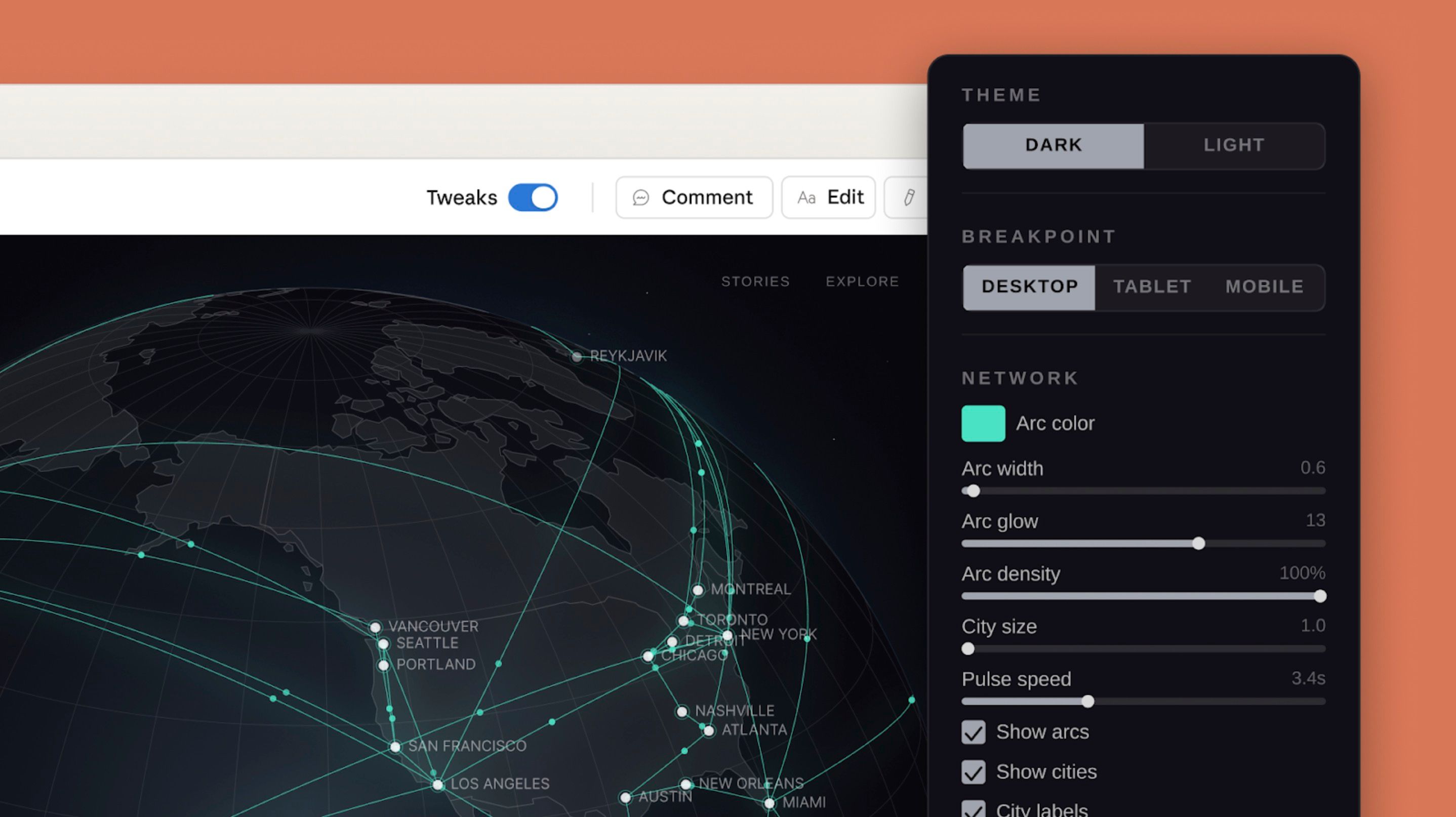
The hero image above shows this in action: the Tweaks panel on the right exposes controls like Arc width, Arc glow, Arc density, City size, and Pulse speed — all adjustable in real time.
Collaboration
- Organization-scoped sharing with privacy controls
- Group conversations with colleagues on the same design
- Real-time collaborative editing
Export Options
| Format | Use Case |
|---|
| Internal URL | Team sharing within Claude.ai |
| PDF | Presentations and documentation |
| PPTX | Microsoft PowerPoint |
| HTML | Direct web publishing |
| Canva | Continue editing in Canva |
| Folder | Download all assets |
Integrations
Canva
Native Canva integration means you can move seamlessly between Claude Design and Canva's editing environment. Generate the structure and content in Claude, then fine-tune in Canva if you prefer its toolset.
Claude Code Handoff
The most technically significant integration: direct handoff bundles to Claude Code.
When you're done designing, Claude Code receives everything it needs to implement the design as working code. This bridges the design-development gap without manual redrawing or spec interpretation.
The workflow:
- Design in Claude Design
- Iterate with inline comments and sliders
- Hand off to Claude Code
- Claude Code implements it in your actual codebase
What You Can Build
Claude Design supports a range of output types:
- Interactive prototypes and wireframes
- Design explorations and iterations
- Pitch decks and presentations
- Marketing collateral and landing pages
- Code-powered prototypes with voice, video, shaders, and 3D elements
That last category is notable. The hero image demonstrates it — a real-time animated 3D globe with parametric controls, not a static mockup. Claude Design can produce web-technology-powered interactive experiences, not just flat visuals.
Pricing and Access
Claude Design is included with existing subscriptions at no additional cost:
| Plan | Status |
|---|
| Claude Pro | Included within existing usage limits |
| Claude Max | Included within existing usage limits |
| Claude Team | Included within existing usage limits |
| Claude Enterprise | Must be enabled by admin in organization settings |
An extra usage option is available for those who need capacity beyond their plan limits.
Access: claude.ai/design
Enterprise note: the feature requires admin enablement — it's not available by default for Enterprise organizations.
The market already has AI-assisted design tools: Figma AI, Canva AI, Adobe Firefly, and others. What differentiates Claude Design:
Conversation-based refinement — it's not one-shot generation. You have an ongoing conversation to shape the design, using natural language the same way you'd direct a designer.
Codebase awareness — connecting to your actual project means generated designs fit your real context, not a generic interpretation.
Claude Code bridge — the design-to-code handoff is more direct than any tool currently on the market. No intermediate spec documents, no manual redrawing.
Persistent design systems — define once, apply everywhere. Other tools require re-specifying brand guidelines per session or per file.
Research Preview Caveats
Claude Design is shipping as a research preview, which means:
- Features are still being developed and may change
- It's not yet production-hardened
- Anthropic is actively gathering feedback to shape the roadmap
For teams considering adopting it for real projects: the core functionality is usable, but plan for iteration as the product evolves.
Bottom Line
Claude Design is Anthropic's move to expand Claude from a conversational assistant into a broader creative production platform.
For small teams or solo operators running design and development together, the combination of design system awareness, multi-modal inputs, and direct Claude Code handoff is genuinely useful — not just a demo feature.
The research preview label means expectations should be calibrated accordingly. But for the right workflow, it's worth trying now.
Try it at claude.ai/design.

